DojoCode Engineering Lab
In four weeks, students build a real project they can present
Students learn and practise through hands-on coding challenges, build a project during a guided hackathon, and test their individual skills in a coding contest created for their class.
Autumn 2026 cohort — applications are open
- 4 weeks
- 8–12 hours total
- C++ / Python / JavaScript
- Fully browser-based
- Free pilot
Build something real
By the end of the Lab, students will have a working project they can demonstrate, practical experience working independently and in teams, individual contest results, and a certificate of participation.
Depending on the class, students could build:
An interactive game or experience
For example, the arcade classic written in Python: Space Invaders
A mobile app that solves a real problem
For example, an app where AI scores your photos and suggests how to improve them: Photo Ranker
An AI-powered assistant or tool
For example, an assistant that spots the dangerous objects in a photo: Hazard Scanner
The project theme is not identical for every class: we choose it together with the teacher, based on the students' level, interests and learning goals.
Aligned with the school curriculum
The Lab strengthens competences the school curriculum already emphasises, so the program fits naturally into classroom work. It can consolidate notions the class has already covered or extend them through practical challenges and a project.
Problem solving
In lessons and coding challenges, students break real problems into smaller steps, verify their solutions with automated tests and improve them based on feedback. The contest then puts these skills to the test individually.
- Lessons
- Challenges
- Contest
Teamwork
During the guided hackathon, students plan together, share responsibilities and present a project built as a team.
- Hackathon
- Project
Interdisciplinary projects
The final project combines programming with design, communication and topics from other subjects, chosen together with the teacher and presented at Demo Day.
- Project
- Demo Day
Together with the teacher, we choose the language, the competences and the course that fit the class.
Languages and technologies can be adapted to the class — including C/C++, Python, JavaScript and SQL.
The four-week journey
Explore
Students discover the platform, understand the Lab theme and solve their first coding challenge.
Outcome: Students understand what they will build and how they will prepare.
Learn and practise
Students complete short lessons, debugging exercises and practical challenges that prepare them for both the project and the contest.
Outcome: The essential skills are developed step by step.
Build
During a guided hackathon, students develop a small working project individually or in small teams.
Outcome: A functional project they can demonstrate.
Compete and present
Students take part in a coding contest with individual programming exercises, then present their projects at Demo Day, in front of the class and invited guests.
Outcome: Individual results, a cohort leaderboard and a Demo Day showcase.
The platform in action
Lessons, challenges, automated tests and the project all run on DojoCode, directly in the browser.
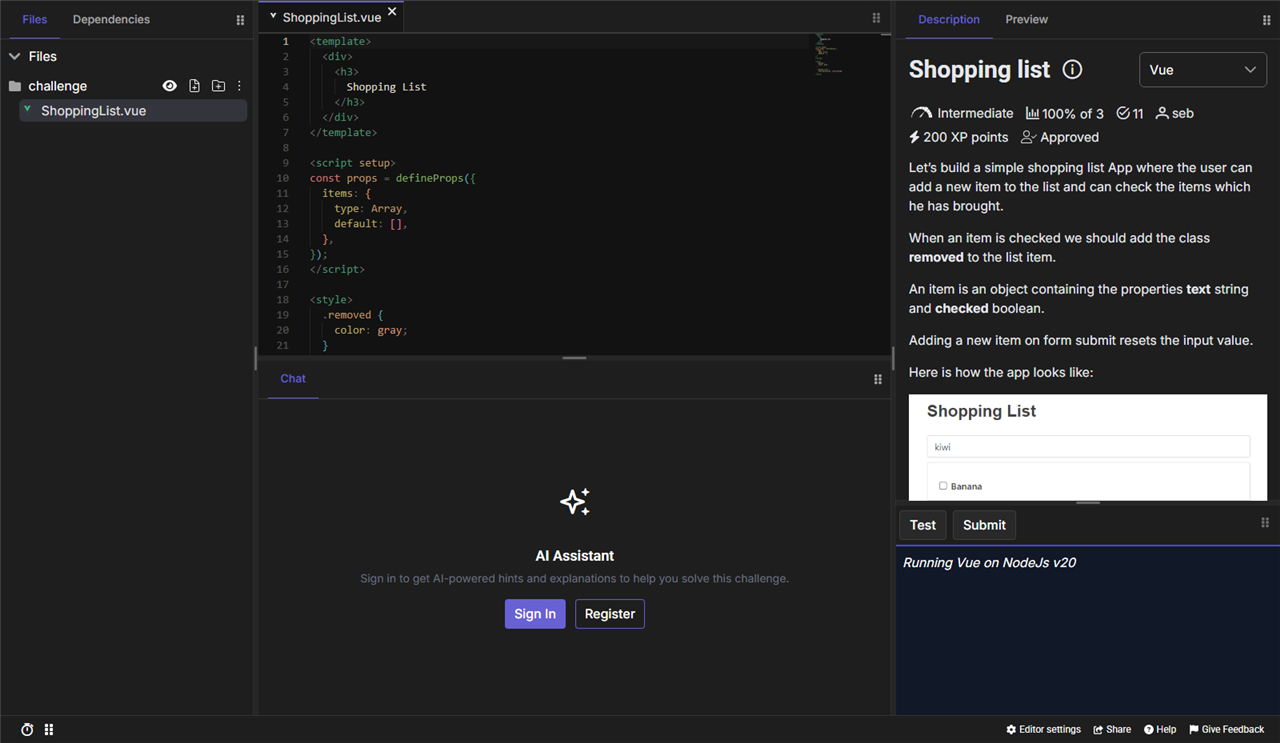

10+ programming languages available
Perfect for building web apps, interactive console programs and even games. With integrated web previews and console output, students get real-time feedback and endless creative possibilities.
- JavaScript
- TypeScript
- Java
- PHP
- C
- C++
- C#
- Go
- Python
- Ruby
- Rust
- Solidity
The languages used in the Lab are chosen to match the level of the class and the selected project theme — with no installation required.
What participation looks like
The following is the recommended format for the first cohorts. We can adapt it to the school's schedule and the needs of the class. The Lab is not a four-week contest: the contest is just one stage of the program, alongside the course and the project.
The teacher's role
The teacher helps us understand the class, chooses an appropriate period and supervises the activities taking place at school.
Teachers do not need to create the lessons, challenges, project or contest themselves. They are also not expected to be experts in every technology used during the Lab.
The expected teacher involvement includes:
- An initial 20–30 minute planning call
- Approximately 30–60 minutes of coordination per week
- Supervision of sessions taking place at school
- Participation in the final project showcase
- Short feedback after the program
What DojoCode provides
DojoCode prepares the learning experience and adapts it to the level and interests of the class.
The program includes:
- Class and student account setup
- A tailored course
- Lessons, coding challenges and debugging exercises
- The hackathon theme and project structure
- A private coding contest for the class
- A teacher progress dashboard
- Student results and a final program report
- Technical support during the Lab
- A short teacher onboarding session
- Support during the introductory workshop and final showcase
- A cohort leaderboard across the participating classes
- Communication materials for the school after Demo Day
Assessment for the AI era
We do not assess students only by whether their final project works.
Students should be able to explain what they built, verify the result and take responsibility for the final product.
AI supports learning without replacing thinking
Students are encouraged to form their own ideas, attempt solutions and discuss their reasoning before receiving AI assistance.
AI can support reflection, feedback and verification, but students must still be able to understand, explain and modify what they create.
The level of AI assistance is configured from the control panel — it can be adjusted or switched off for specific lessons, challenges or the contest, depending on the goals of each activity.
What students leave with
Students receive:
- A functional project they can present
- Individual challenge and contest results
- Feedback on their work
- A certificate of participation
- Recommendations for their next learning steps
- The option to continue learning on DojoCode
What teachers receive
Teachers receive:
- A dashboard showing class progress
- Access to student projects and results
- Individual contest results
- A final program report
- Founding partner school status, with a badge for the school website
- Recommendations for continuing the learning experience
The team behind the program
The Lab is designed and run by the DojoCode team — the same people who build the platform and who will work directly with your class.




Free for selected teachers
The autumn 2026 cohort is open to teachers, with an unlimited number of classes. Applications are open.
The first edition is offered at no cost to the selected teachers.
We are looking for teachers who would like to test the program with their students and provide honest feedback before and after the Lab.
Apply for the programWhat happens after you apply
- 1
We review your application
We learn about the school, the students and their current level.
- 2
We schedule a 30-minute call
We discuss the class, learning goals, available time and preferred format.
- 3
We select the theme and schedule
Together, we choose the project direction, difficulty level and period.
- 4
We prepare the Lab
DojoCode configures the course, challenges, hackathon and contest.
- 5
We launch the program
Students join the introductory workshop and begin the four-week journey.
Frequently asked questions
Apply for the program
Tell us a little about your school and students. If the Lab appears to be a good fit, we will contact you to arrange a short 30-minute conversation.